
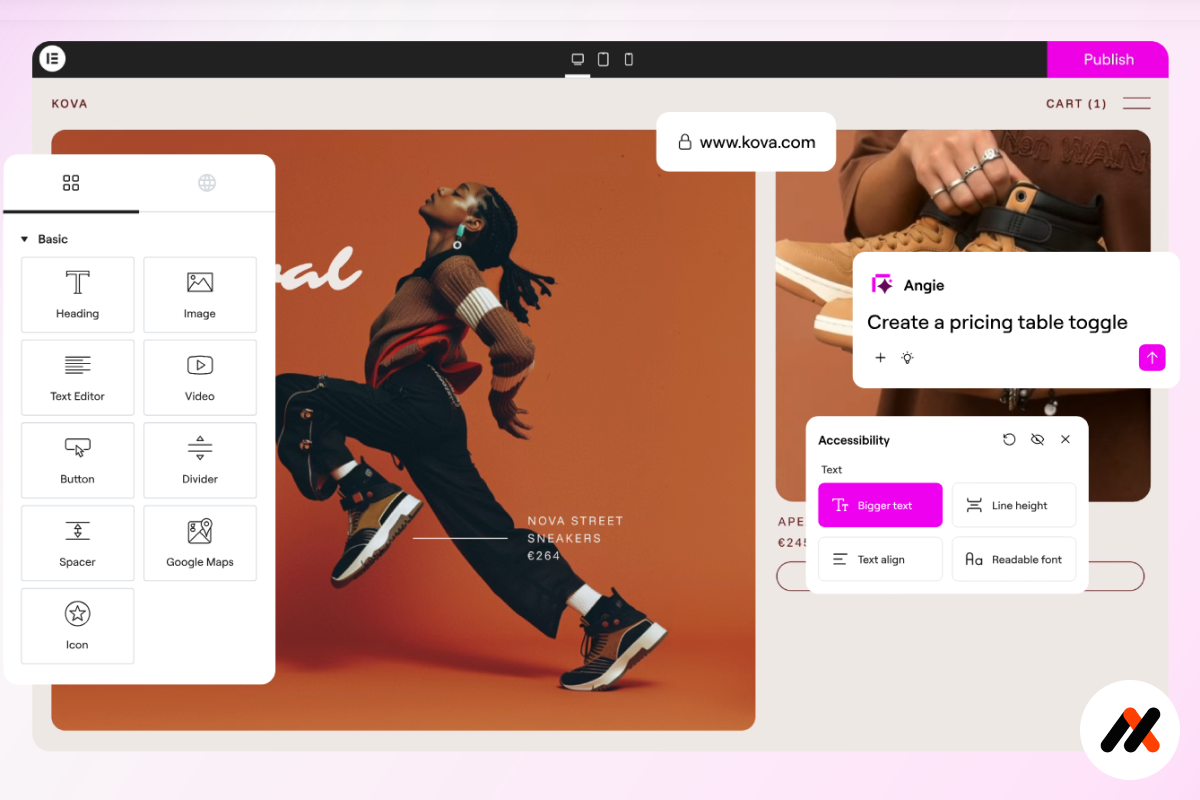
Elementor is one of the most popular WordPress page builders in the world, used by millions of website owners, designers, and businesses. It allows you to build professional, high-performing websites visually – without writing code — while maintaining full control over layout, design, and responsiveness.
As a web designer with over 8 years of experience, I’ve tested and worked with countless WordPress tools and frameworks. Elementor consistently stands out as one of the most flexible, scalable, and beginner-friendly solutions for building modern websites.
In this guide, you’ll learn what Elementor is, its key advantages and disadvantages, how it affects performance and SEO, and whether it’s the right choice for your website in 2026.
What Is Elementor?
Elementor is a drag-and-drop visual page builder plugin for WordPress. It replaces the default WordPress editor with a real-time frontend editor, allowing you to design pages visually and see changes instantly.
With Elementor, you can:
- Build custom layouts without coding
- Design landing pages, blogs, portfolios, and business websites
- Create headers, footers, popups, and theme templates
- Control typography, colors, spacing, and animations visually
Elementor works with almost any WordPress theme and integrates seamlessly with WooCommerce, analytics tools, SEO plugins, and marketing platforms.
Key Benefits of Elementor
1. Visual, Real-Time Editing
Elementor allows you to design directly on the page. What you see is exactly what your visitors will see – no preview windows, no guessing.
2. Beginner-Friendly, Yet Powerful
Elementor is easy enough for beginners but powerful enough for professional designers and agencies. You can start with ready-made templates or build fully custom layouts from scratch.
3. Full Design Control
Elementor provides advanced controls for:
- Responsive design
- Global styles
- Custom fonts and colors
- Motion effects and animations
- Dynamic content
This level of flexibility makes Elementor ideal for building strong brands and scalable websites.
4. Massive Template Ecosystem
There are thousands of Elementor templates available online, including premium template kits for business, eCommerce, coaching, blogs, and portfolios. These templates help you launch professional websites faster and more efficiently.
5. Strong Integrations and Ecosystem
Elementor integrates with:
- WooCommerce
- Mailchimp, HubSpot, ActiveCampaign
- ACF, Pods, Toolset
- SEO plugins like Rank Math and Yoast
This makes it a powerful foundation for both content-driven and conversion-focused websites.
| Feature | Free Version | Pro Version |
|---|---|---|
| Visual drag-and-drop editor | ✅ | ✅ |
| Basic widgets | ✅ | ✅ |
| Advanced widgets (forms, sliders, pricing tables) | ❌ | ✅ |
| Theme builder (header, footer, single templates) | ❌ | ✅ |
| Popup builder | ❌ | ✅ |
| WooCommerce builder | ❌ | ✅ |
| Dynamic content | ❌ | ✅ |
For business websites, Elementor Pro is usually worth the investment due to its advanced design and marketing capabilities.
Elementor Pros and Cons
Pros
- No coding required
- Extremely flexible and customizable
- Large ecosystem of templates and extensions
- Works with almost any WordPress theme
- Great for freelancers, agencies, and entrepreneurs
- Regular updates and active development
Cons
- Can add extra page weight if not optimized
- Advanced features require Elementor Pro
- Poorly built templates can affect performance
- Overuse of animations and widgets may slow down pages
These issues can be minimized with good hosting, clean design practices, and proper optimization.
Performance and SEO with Elementor
Elementor is fully compatible with SEO best practices when used correctly:
- Clean HTML structure
- Proper heading hierarchy
- Full control over layout and content structure
- Seamless integration with SEO plugins
Website performance depends largely on:
- Hosting quality
- Theme optimization
- Image compression
- Caching and CDN usage
With proper setup, Elementor websites can achieve excellent Core Web Vitals and PageSpeed scores.
Who Should Use Elementor?
Elementor is ideal for:
- Small business owners
- Entrepreneurs and coaches
- Bloggers and content creators
- Web designers and freelancers
- Agencies building client websites
- WooCommerce store owners
If you want full creative control without relying on developers, Elementor is one of the best website builders available.
Elementor vs Other Page Builders
Compared to tools like Gutenberg, Divi, or Beaver Builder, Elementor offers:
- Faster design workflow
- More advanced styling controls
- Larger template ecosystem
- Stronger marketing and dynamic content features
While Gutenberg continues to improve, Elementor remains the leader in visual flexibility and professional website design.
Final Verdict: Is Elementor Worth It in 2026?
Yes – Elementor remains one of the best WordPress page builders in 2026.
It offers:
- Fast website development
- Full design freedom
- Scalability for growing businesses
- A strong ecosystem of tools and templates
When paired with quality hosting and optimized templates, Elementor enables you to build fast, beautiful, and conversion-focused websites with ease.
It may be interesting:
How to Choose a WordPress Theme for Your Website
5 Best Elementor Templates for Your Website
Bonus Tip:
Written by Alex
Web Designer with 8+ years of experience building WordPress websites for service-based businesses.
Some links may be affiliate links, meaning we may earn a commission at no extra cost to you.